1
Trigger-Based Rules
Start automations from failed inspections, critical alerts, idle time, or thresholds.
Learn how it works →No-code workflows for heavy equipment operations.
Build rules that connect events, people, and actions across your fleet operations.
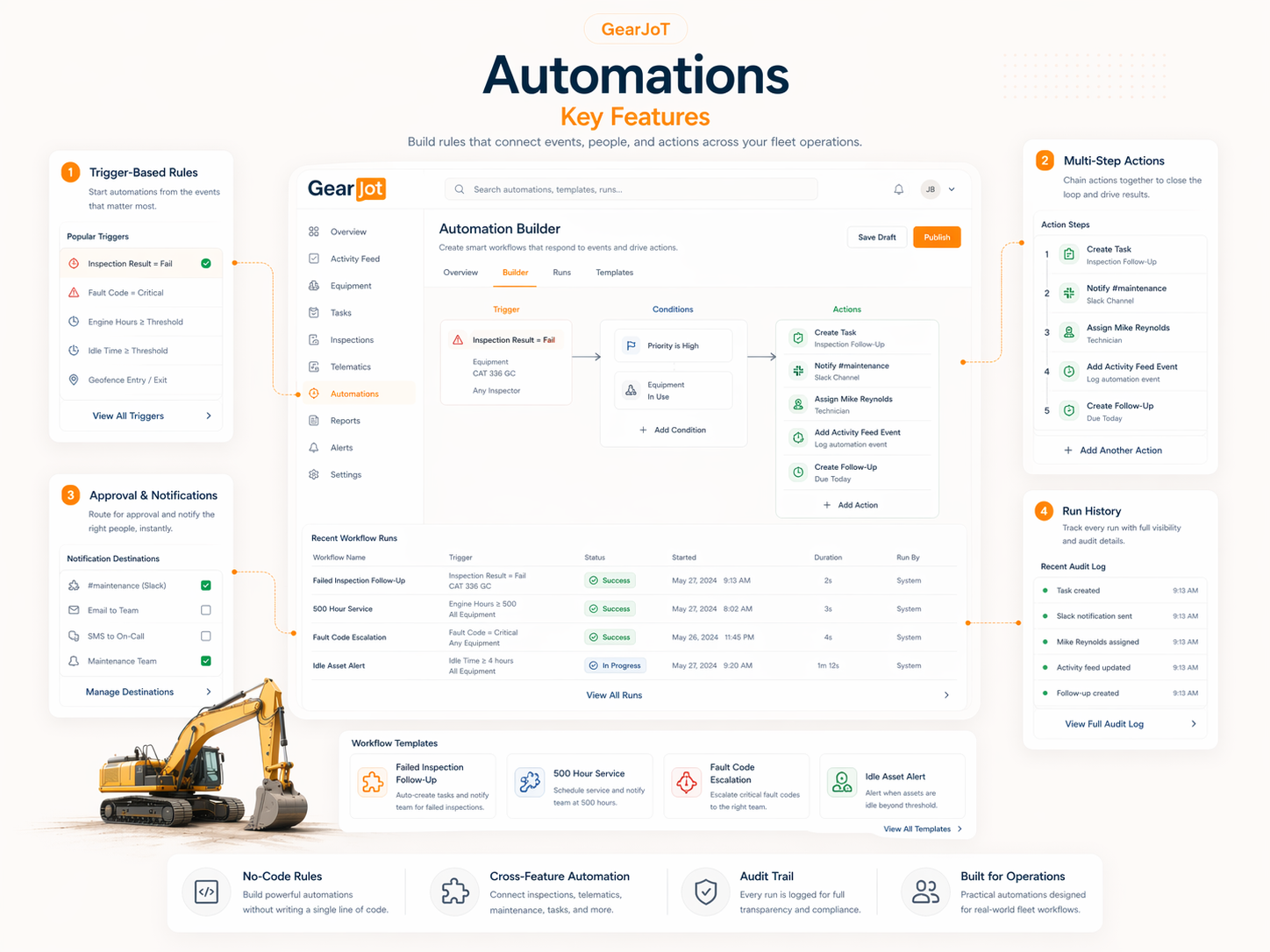
Key Features
Start automations from failed inspections, critical alerts, idle time, or thresholds.
Learn how it works →Create tasks, notify teams, assign owners, update activity, and follow up.
Learn how it works →Route decisions and updates to the right team instantly.
Learn how it works →Track every workflow run for accountability and compliance.
Learn how it works →Product View
Preview the information architecture behind this page with representative GearJoT data and status flows.
| Asset | Type | Status | Owner |
|---|---|---|---|
| CAT 336 GC | Excavator | In Use | Mike Reynolds |
| CAT 950 GC | Wheel Loader | Due Soon | Sarah Davis |
| CAT 777G | Haul Truck | Critical | Tom Alvarez |
Workflow
Inspection fails or telematics alerts fire.
Priority, asset, location, or team rules apply.
Tasks, messages, service events, and records update.
Every step is logged and visible.
Ready to see Automations in action?
Schedule a walkthrough and see how this workflow can be tailored to your team.